Compliant ID photos,
without the studio.
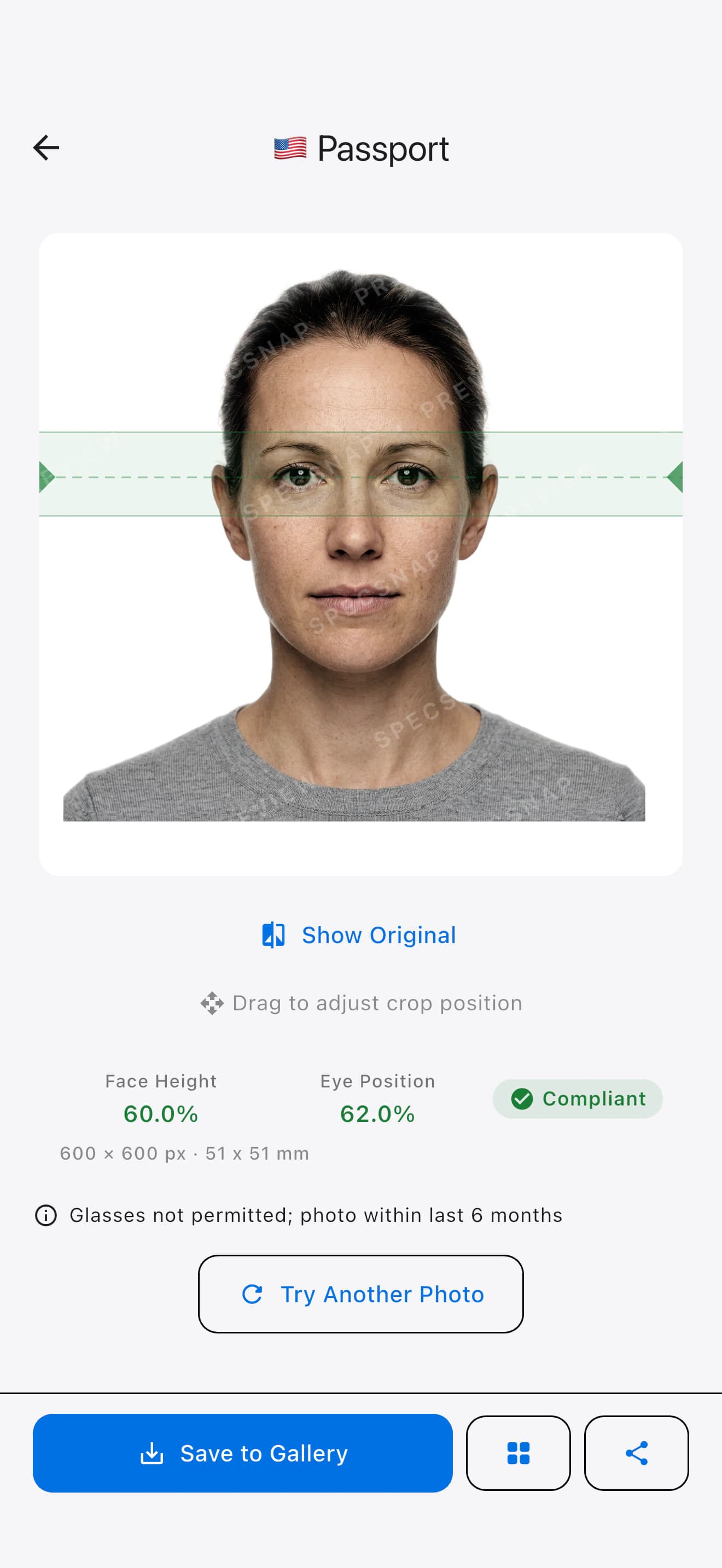
Snap a photo. SpecSnap auto-detects your face, removes the background, and crops to the exact pixel spec required by passports, visas, and IDs across 22 countries. Validated on-device. Ready to upload or print.
White · 400 × 514 px
Target 70 – 80%
 Singapore
 Malaysia
 Indonesia
 Thailand
 Philippines
 Vietnam
 Laos
Laos Japan
Japan Taiwan
 Hong Kong
 New Zealand
 United States
 Schengen Area
 Australia
 India
India United Kingdom
 Mexico
 China
China Saudi Arabia
 United Arab Emirates
 Canada
 South Korea
Three taps from
any selfie to submission-ready.
No passport-photo booths. No Photoshop. The whole pipeline — detection, segmentation, crop, validation, export — runs entirely on your phone in under four seconds.
Snap or pick a photo.
Use the in-app camera with live face-framing guides, or import any shot from your library. The app checks framing, pose, eyes, and blur before you export.
We auto-correct the frame.
Face detection locates your eyes, head, and chin. Background segmentation cleans to white — or the specific red, blue, or grey your document requires.
Export to exact spec.
Save a digital copy for online portals, generate a 4×6-print layout with crop marks, or come back later from local history to re-export or delete a shot.
Every spec. Every tolerance.
Audited and kept current.
SpecSnap ships with the exact dimensions, face-height ratios, eye-line positions, file-size caps, and background colour requirements for 57 document types. Swap between them in one tap — the photo revalidates live.
Passport / IC
Visa
Work Pass
Driving Licence
International Driving Permit (IDP)
Passport
eVISA (Social Visit)
Employment Pass
Driving Licence (Print)
Passport
e-Visa / e-VoA
Visa (35×45 mm)
Visa (4×6 cm)
KTP (Odd birth year)
KTP (Even birth year)
Passport
Visa
e-Visa (Digital)
Work Permit
Passport
Visa (2×2 in)
General ID (2×2 in)
NBI Clearance
e-Visa
e-Visa
Passport
Visa
Residence Card / Status
Passport
Visitor Visa (Tourism)
Passport (Print)
Passport (Digital upload)
Visa / Entry Permit
Passport
Passport
Visa (DS-160)
Diversity Visa Lottery
Visa
Passport
Citizenship
Passport
Visa
e-Visa / e-VoA
OCI
PAN Card
Passport
Visa / Permission
Visa (2×2 in)
Visa
Tourist eVisa (Visit Saudi)
Visa
Passport
Visa / Permit
Permanent Resident Card
Passport
Visa
Residence Card (ARC)
Live validation
against the actual rulebook.
Every crop is measured against the published tolerance ranges for the selected document. Pass or warn, in real time — no "submit and hope."
The same checks the authority will run — before you submit.
- Face height & eye line measured from the pupil midpoint with sub-pixel accuracy, clamped to the tolerance range your authority publishes.
- Background colour checked across a sampled grid — catches gradients and fringe from poor segmentation (ΔE < 3 against spec).
- File-size ceiling enforced per-spec — recompressed silently for sub-60 KB e-visa portals, lossless for print.
- Sharpness & expression guards warn on blur, closed eyes, or non-neutral expressions before you export.
Your face never leaves
your phone.
SpecSnap runs face detection and background removal locally using on-device ML. No upload. No account required. No server copies. The only network call the app makes is for in-app purchases.
On-device processing
Face detection, background segmentation, and compliance checks all run locally. Nothing about your photo is transmitted.
No account, no email
Open and shoot. SpecSnap doesn't make you sign up. Your local history stays on your device, so you can revisit, re-export, or delete past photos anytime.
Free to download
SpecSnap is free to download and try every spec — no sign-up, no subscription. The preview is watermarked; a clean, watermark-free photo is a one-time in-app purchase per shot on iPhone and Android.
Your image bytes are processed entirely on your device's secure enclave and neural engine.
From shutter to compliant export on a typical phone from the last four years.
Passports, visas, driving licences, work passes, and national IDs across 22 countries.
English, Bahasa Indonesia, ไทย, Bahasa Melayu, 简体中文, 繁體中文, Español, Deutsch, Français, العربية, Filipino — switch on the fly.
Before you download.
Will my photo actually be accepted by the authority?
Which documents are supported today?
Does SpecSnap upload my photo anywhere?
Can I use ChatGPT or Gemini to generate my passport photo?
What phones does it run on?
How much does SpecSnap cost?
Shoot once. Ship anywhere around the world.
SpecSnap is free to download. Try it on the next passport renewal, visa application, or driving-licence form sitting in your inbox.